AI TOOL / #09906
Nuclia tools
Chrome extensions allow users to index web pages and YouTube videos into the Nuclia knowledge base.
Introduction
Chrome extension to index web pages and YouTube videos into Nuclia knowledge boxes.
What is the Nuclia Chrome Extension? What is an AI-based Chrome extension/plug-in?
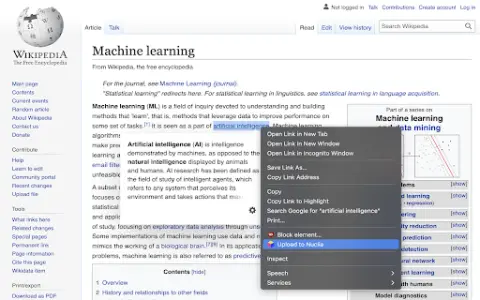
The Nuclia Chrome extension enables users to easily index web pages and YouTube videos into the Nuclia knowledge base. All they need to do is right-click on a link to quickly add the relevant content to the index. If a YouTube API key is available, the extension can also index all the videos within an entire YouTube channel or playlist.
How to use the Nuclia Chrome Extension or the ai Chrome extension plugin?
Install the Nuclia Chrome extension. Right-click on a web page or a link to a YouTube video and select the option to index it in your Nuclia knowledge base. For YouTube channels or playlists, you will need to provide your YouTube API key in the extension settings.
The core functionality of the Nuclia Chrome Extension is specifically designed for use within the Chrome browser.
Index the web pages in the Nuclia knowledge base.
Indexing YouTube videos into the Nuclia knowledge base
Index an entire YouTube channel or playlist (API key required).
Related
QR code recognition (PixPix)
The screenshot will not be uploaded for code recognition.
Wallpaper size adaptation (PixPix)
Convert photo to full screen wallpaper
Converting PDF files to images (PixPix)
Export PNG/JPG files page by page.
Circular Profile Image Cropping (PixPix)
Transparent circular profile image
VO3 AI
AI-generated video tool
Roofline
End-to-end AI deployment toolchain