AI TOOL / #07462
Vision AI
A Chrome extension that enables AI-driven insights based on screenshot data.
Introduction
Chrome extension for AI-powered insights from screenshots.
What is a Vision AI Chrome extension/plug-in?
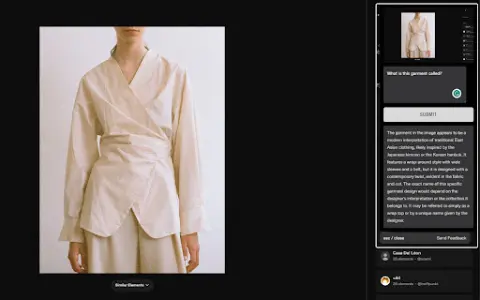
Visual AI is a Chrome extension that combines screenshot functionality with AI-driven insights to enhance online information search. It allows users to capture any portion of a web page, add notes or questions, and receive AI-generated responses based on the context of the captured image.
How to use the Vision AI Chrome extension/plug-in?
Install the Visual AI Chrome extension. Use CTRL + SHIFT + Y to take a screenshot, and then add any notes or questions you have. Visual AI will analyze the screenshot and provide an AI-generated response.
The core functions of the Vision AI Chrome extension/plugin
Screenshot capture
Interactive AI Suggestions
Seamless browser integration
Suitable for a wide range of applications in various fields
Privacy and Security
Related
Super Calendar
Tools based on NLP can convert web page content into calendar events.
Text to Calendar
Browser extensions that allow users to create calendar events by highlighting specific text.
Purpose – Impactful Giving
PurposeTech.ai simplifies philanthropy and grant applications with AI-powered tools.
ezai.io
EZAI: A secure and customizable AI solution designed for enterprise integration and automation.
Lumi Tarot
Online astrology and tarot readings, offering personalized insights.
NisusAI | Generative AI Platform
NisusAI: A no-code platform for building and deploying generative AI assistants.