AI TOOL / #07222
ReadImage
Extract, edit, and copy text from images on web pages.
Introduction
Extracts, edits, and copies text from images on web pages.
What is Image Text Extractor ai chrome extension/plugin?
This extension allows users to extract text from images displayed on web pages. It supports common image formats such as jpg, jpeg, png and bmp. After extraction, the text can be edited and copied.
How to use Image Text Extractor ai chrome extension/plugin?
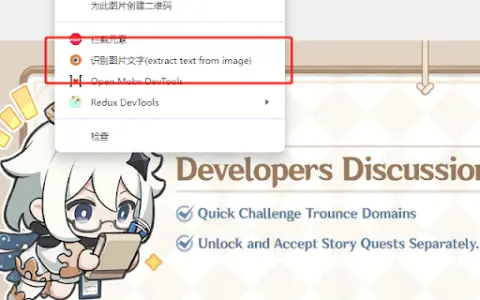
Hover your mouse over the image, right-click and select "Extract text from image". Press "Ctrl + Q" to view the extracted text on the extension page, where it can be edited and copied.
Image Text Extractor ai chrome extension/plugin core features
Extract text from images on web pages
Edit extracted text
Copy extracted text
Related
Hoop
An AI-based task management tool that automatically captures tasks mentioned in meetings, emails, and Slack messages.
SceneSnap
A GenAI tool for summarizing and personalizing video content to enable efficient learning.
MBox AI meet
An AI meeting assistant that provides real-time transcription and summarization for Google Meet.
Looppanel – Record & Transcribe Video
Looppanel automatically records and transcribes meetings and provides AI-based insights for user research.
SenseProfile
AI-based conversation analysis platform for understanding meaning and emotional context.
Scribie
Accurate and affordable human-verified transcription services, enhanced with AI.