AI TOOL / #07177
Chrome Virtual Camera
Use the clock, video file, and background masking options in place of getUserMedia().
Introduction
Replaces getUserMedia() with clock, video file, and background masking options.
What is the getUserMedia() Replacement AI Chrome extension/plug-in?
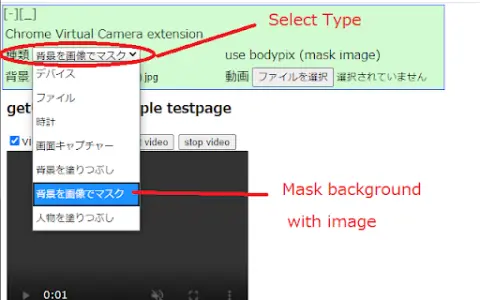
This tool replaces the standard getUserMedia() function, enabling the use of clocks, video files, as well as the tfjs/body-pix technology as background masks for video sources.
How to use the getUserMedia() Replacement AI Chrome extension/plug-in?
This tool intercepts calls to the getUserMedia() function and provides alternative video sources, such as clocks, video files, or video streams with masks using tfjs/body-pix. The specific implementation and configuration details depend on the particular library or technology being used.
The core functionality of the getUserMedia() replacement AI Chrome extension/plug-in
Replace the getUserMedia() function
Provide a clock as the video source.
Provide a video file as the source material for the video.
Implement background masking using tfjs/body-pix.
Related
AI Image Translator For Ecom Image
An advertising and dropshipping platform focused on TikTok ads and product research.
MagicBrief – Save Facebook & TikTok ads
Chrome extension to save, analyze and disassemble Facebook and TikTok ads.
Growtake
AI-powered advertising automation tool that makes multi-platform ad placement effortless.
Creative Score
Creative Score utilizes behavioral science and market research to optimize marketing assets.
Plug & Play AI Marketing Team
An intelligently driven marketing team, utilized for event planning, multimedia creation, and ad optimization.
AdFreeMusic
Create a Spotify playlist from your favorite radio stations and enjoy an ad-free listening experience.