AI TOOL / #06171
Patsa – AI-powered Meeting Copilot
A Chrome extension that enables real-time transcription and AI-powered Q&A during online meetings.
Introduction
Chrome extension for real-time transcription and AI-powered Q&A during online meetings.
What is the Patsa AI Chrome extension/plugin?
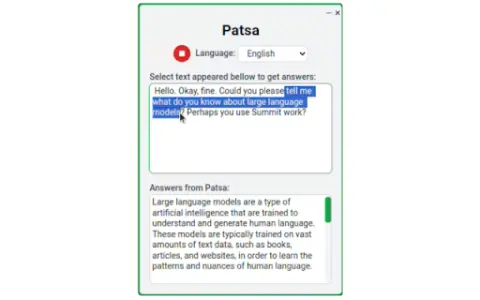
Patsa is a Chrome browser extension designed to enhance online meetings on platforms such as Google Meet, Zoom, and Teams. It transcribes other participants’ speech in real time and lets users select transcribed text to ask AI questions, providing instant information and answers.
How do I use the Patsa AI Chrome extension/plugin?
1) Launch the Patsa extension in any online meeting in Chrome. 2) Click the "Start Transcribing" button to transcribe what the other participants are saying. 3) Select the transcript text you want to ask the AI about, and you'll receive an instant response from the AI.
Core features of the Patsa AI Chrome extension/plugin
Real-time transcription of participants’ speech
AI Q&A based on transcribed text
Related
UnravelAI
UnravelX transforms static content into interactive training experiences by utilizing 3D scenarios.
MAXP
A gamified online education platform that teaches students in grades 8-11 future job skills.
Chat2Course
An artificial intelligence platform designed specifically for creating and customizing online courses.
studymap.ai
AI-powered personalized learning plans and structured courses.
UpTroop
An AI-driven learning platform that offers personalized corporate training and employee development opportunities.
CreateAICourse (cAIc)
An AI platform for creating online courses quickly and easily.