AI TOOL / #05339
Chatgpt – Google Doc Analyser
Analyze Google Documents to obtain insights and summaries – no need to manually copy and paste the content into AI tools.
Introduction
Analyzes Google Docs, providing insights and summaries without manual copy-pasting to AI tools.
What is the Google Documents Analyzer Extension for Chrome? What is this extension/plug-in?
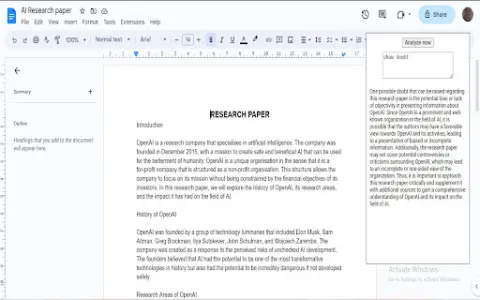
The Google Docs Analysis Extension is a tool designed to analyze documents created by Google Docs, eliminating the need to manually copy and paste them into AI systems such as OpenAI’s ChatGPT. It provides suggestions and generates solutions to help users understand contracts, research papers, transcribed texts, and other materials.
How to use the Google Documents Analyzer Extension for Chrome?
Install the Google Docs Analysis extension. Open a Google Doc – whether it’s a contract, a research paper, or transcribed text – and use the prompts provided to analyze the document. This extension will generate solutions or summaries based on the content of the document.
The core functionality of the Google Documents Analyzer Extension for Chrome.
Tips for analyzing Google Docs
Generate summaries and insights directly within Google Docs.
Eliminate the need to manually copy and paste data into external AI tools.
Related
End Boost
AI-based automatic audio mixing software designed specifically for video editors.
Nfig AI
Nfig is an API that allows AI agents to use natural language to automate web tasks automatically.
ContentMod
An AI-driven API for text and image moderation, ensuring a secure online environment.
SpaceSerp – Powerful SERP API
SpaceSerp is a SERP API for real-time Google data extraction.
Pig
An API designed to automate Windows applications using AI technology.
API2D
API2D is a platform that facilitates easy access to a variety of AI APIs.