AI TOOL / #04050
AI Roundtable
Ask a question and receive answers from multiple AI assistants.
Introduction
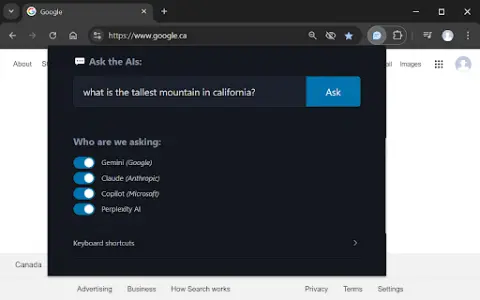
Ask one question, get answers from multiple AI assistants.
What is a Multiple AI Assistants Chrome extension/plug-in?
This website allows users to submit questions at once and receive answers from multiple AI assistants. Users can customize which assistant they want to use for their queries. The website also provides keyboard shortcuts, making it easy to access various functions quickly.
How to use the Multiple AI Assistants Chrome extension?
Use the shortcut keys Ctrl/Cmd + Shift + Q to open the query window and start typing your question. Use Alt + 1 to switch to Gemini, Alt + 2 to switch to Claude, Alt + 3 to switch to Copilot, and Alt + 4 to switch to ChatGPT.
The core functions of various AI Assistant extensions/plugins for Chrome.
Query multiple AI assistants simultaneously
It is possible to customize the selection of AI assistants.
Convenient and fast keyboard shortcuts
Related
Interior Decorator AI
AI-powered web applications designed to generate creative ideas for both indoor and outdoor decorations.
Social Intents
Get to know the world’s leading AI-powered real-time chat and website chat robots – they are compatible with your Slack, Microsoft Teams, and Google Chat teams.
helpix AI
Helpix AI is an AI platform for automated customer service and sales across multiple channels.
skcript.com
Skcript focuses on building enterprise AI products to enable business optimization, with a strong emphasis on solving problems and driving revenue growth.
Pylon
A modern B2B support platform that unifies ticketing, AI, knowledge base, and customer portal.
ToMate by Human Trends
An integrated AI marketing platform designed for content creation and social media management.