AI TOOL / #03920
ChatGPTalk Sidebar
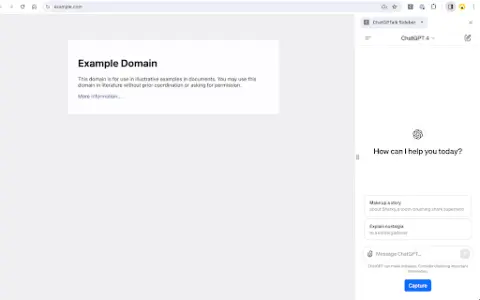
The ChatGPT integration in the sidebar facilitates text capture and interaction.
Introduction
ChatGPT integration in a sidebar for easy text capture and interaction.
What is the ChatGPTTalk Sidebar AI Chrome extension/plug-in?
The ChatGPTTalk Sidebar extension enhances the web browsing experience by integrating ChatGPT into a convenient sidebar. It allows users to extract text from web pages or YouTube subtitles and automatically copy it into the ChatGPT input field for generating summaries or performing other interactions. This extension also includes prompt templates and intelligent text segmentation features, which make it easier to work with longer documents.
How to use the ChatGPTTalk Sidebar AI Chrome extension/plug-in?
Install the ChatGPTTalk Sidebar extension. Open a web page or a YouTube video, and then click the “Capture” button in the sidebar to extract the text or subtitles. The extracted text will be automatically copied and pasted into the ChatGPT input field, along with a predefined prompt template. You can then interact with ChatGPT as needed.
The core functions of the ChatGPTTalk Sidebar AI Chrome extension/plugin
Integration of ChatGPT
Text capture
prompt template
YouTube subtitles
Intelligent text segmentation
Related
Top Pushup v2
An AI-based application designed to count push-ups and provide real-time feedback to help improve one's form.
Ab Gym Tips – Treino Online
A comprehensive fitness app offering personalized training, nutrition, and progress tracking.
Healthyapp: daily healthy reminders
A Chrome extension that provides health reminders, along with an AI-based personal coach and customizable health settings.
AquaAdvisor-AI water tracker
AI-powered hydration assistant...
VPT.FIT
An AI-based fitness platform offering customized workout plans and expert coaching.
Impakt: AI Based Social Fitness
AI fitness coach combining AI...